Usage
There are multiple ways how to use this repository and the MQT Bench package.
Via the webpage hosted at https://mqt-bench.app/,
Programmatically via the Python package
mqt-bench, orVia the command line interface (CLI) of the
mqt-benchpackage.
Usage via the Webpage
The MQT Bench webpage provides an interactive, no-code interface to generate and download benchmark circuits. You can access it at https://mqt-bench.app/.
Usage via the mqt-bench Python package
After following the installation guide, you can use the
mqt-bench package in your Python code.
To generate a benchmark circuit, use the get_benchmark()
method. The available parameters are described on the
parameter space description page and the algorithms are
described on the algorithm page. For example, in
order to obtain the 5-qubit Deutsch-Josza benchmark on algorithm level, use
the following:
1from mqt.bench import BenchmarkLevel, get_benchmark
2
3qc = get_benchmark("dj", BenchmarkLevel.ALG, 5)
4qc.draw(output="mpl")
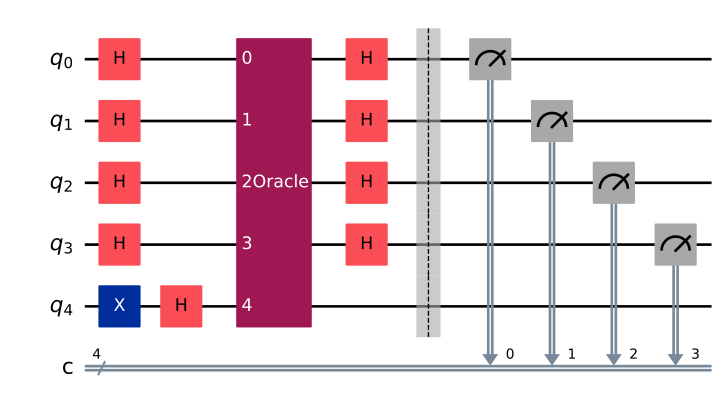
Further examples can be found in the Quickstart guide.
Usage via the Command Line Interface (CLI)
In addition to the Python API, MQT Bench provides a flexible and lightweight command-line interface (CLI) to generate individual benchmark circuits.
The easiest way to get started with the CLI is via
uv. Simply run
uvx mqt-bench <options>
You do not need to install the package for this, as uv will handle everything
for you. You don’t even need to have Python installed, as uv will download a
pre-built binary for your platform.
Alternatively, installing the mqt-bench Python package as described in the
installation guide will also provide you with the CLI.
CLI Options
The available options can be viewed by running the command:
mqt-bench --help
usage: mqt-bench [-h] --level {alg,indep,nativegates,mapped}
                 --algorithm ALGORITHM --num-qubits NUM_QUBITS
                 [--optimization-level {0,1,2,3}] [--target TARGET]
                 [--random-parameters | --no-random-parameters]
                 [--output-format {qasm2,qasm3,qpy}]
                 [--target-directory TARGET_DIRECTORY] [--save] [--mirror]

Generate a single benchmark

options:
  -h, --help            show this help message and exit
  --level {alg,indep,nativegates,mapped}
                        Level to generate benchmarks for ("alg", "indep",
                        "nativegates" or "mapped").
  --algorithm ALGORITHM
                        Name of the benchmark (e.g., 'grover', 'shor').
  --num-qubits NUM_QUBITS
                        Number of qubits for the benchmark.
  --optimization-level {0,1,2,3}
                        Qiskit compiler optimization level (0-3).
  --target TARGET       Target name for native gates and mapped level (e.g.,
                        'ibm_falcon' or 'ibm_washington').
  --random-parameters, --no-random-parameters
                        Whether to assign random parameters to parametric
                        circuits (default: True). Use --no-random-parameters
                        to disable.
  --output-format {qasm2,qasm3,qpy}
                        Output format. Possible values: ['qasm2', 'qasm3',
                        'qpy'].
  --target-directory TARGET_DIRECTORY
                        Directory to save the output file (only used for 'qpy'
                        or if --save is specified).
  --save                If set, save the output to a file instead of printing
                        to stdout (e.g. for 'qpy', which is not available as
                        text).
  --mirror              If set, generate the mirror version of the benchmark
                        (circuit @ circuit.inverse()).

MQT Bench version: 2.3.1.dev15+gd23df0d5d
Qiskit version: 2.5.2
Example Usage
To generate a 5-qubit Deutsch-Josza benchmark circuit at the algorithm level and print it in OpenQASM 3 format, you can use the following command:
mqt-bench --level alg --algorithm dj --num-qubits 5 --output-format qasm3
// Benchmark created by MQT Bench on 2026-09-29
// For more info: https://mqt-bench.app/
// MQT Bench version: 2.3.1.dev15+gd23df0d5d
// Qiskit version: 2.5.2
// Output format: qasm3

OPENQASM 3.0;
include "stdgates.inc";
gate Oracle _gate_q_0, _gate_q_1, _gate_q_2, _gate_q_3, _gate_q_4 {
  x _gate_q_0;
  x _gate_q_1;
  cx _gate_q_0, _gate_q_4;
  cx _gate_q_1, _gate_q_4;
  cx _gate_q_2, _gate_q_4;
  cx _gate_q_3, _gate_q_4;
  x _gate_q_0;
  x _gate_q_1;
}
bit[4] c;
qubit[5] q;
x q[4];
h q[4];
h q[0];
h q[1];
h q[2];
h q[3];
Oracle q[0], q[1], q[2], q[3], q[4];
h q[0];
h q[1];
h q[2];
h q[3];
barrier q[0], q[1], q[2], q[3], q[4];
c[0] = measure q[0];
c[1] = measure q[1];
c[2] = measure q[2];
c[3] = measure q[3];
To generate a 5-qubit Deutsch-Josza benchmark circuit at the mapped level for the 27-qubit IBM Falcon target and save it in OpenQASM 3 format, you can use:
mqt-bench --level mapped --algorithm dj --num-qubits 5 --optimization-level 3 --target ibm_falcon_27 --output-format qasm3 --save
dj_mapped_ibm_falcon_27_opt3_5.qasm
The command will output the filename where the generated circuit is saved, which you can then use, for example to display the contents of the file:
// Benchmark created by MQT Bench on 2026-09-29
// For more info: https://mqt-bench.app/
// MQT Bench version: 2.3.1.dev15+gd23df0d5d
// Qiskit version: 2.5.2
// Output format: qasm3
// Level: mapped
// Target: ibm_falcon_27
// Used gateset: ['id', 'x', 'sx', 'rz', 'cx', 'reset', 'delay', 'measure', 'if_else', 'while_loop', 'for_loop', 'switch_case', 'break', 'continue', 'box']
// Coupling map: [[0, 1], [1, 0], [1, 2], [1, 4], [2, 1], [2, 3], [3, 2], [3, 5], [4, 1], [4, 7], [5, 3], [5, 8], [6, 7], [7, 4], [7, 6], [7, 10], [8, 5], [8, 9], [8, 11], [9, 8], [10, 7], [10, 12], [11, 8], [11, 14], [12, 10], [12, 13], [12, 15], [13, 12], [13, 14], [14, 11], [14, 13], [14, 16], [15, 12], [15, 18], [16, 14], [16, 19], [17, 18], [18, 15], [18, 17], [18, 21], [19, 16], [19, 20], [19, 22], [20, 19], [21, 18], [21, 23], [22, 19], [22, 25], [23, 21], [23, 24], [24, 23], [24, 25], [25, 22], [25, 24], [25, 26], [26, 25]]

OPENQASM 3.0;
include "stdgates.inc";
bit[4] c;
rz(pi/2) $3;
sx $3;
rz(pi) $3;
rz(-pi) $5;
x $5;
rz(pi/4) $8;
sx $8;
rz(pi/2) $8;
rz(pi/2) $9;
sx $9;
cx $9, $8;
rz(-pi/2) $8;
sx $8;
rz(-pi/4) $8;
sx $8;
rz(pi/2) $8;
sx $9;
rz(pi/2) $9;
rz(-pi/2) $11;
sx $11;
rz(pi) $11;
cx $11, $8;
rz(pi/2) $8;
cx $5, $8;
rz(-pi/2) $5;
sx $5;
rz(-pi/2) $5;
rz(pi/2) $8;
cx $5, $8;
sx $5;
cx $3, $5;
sx $3;
rz(pi/2) $3;
rz(pi/2) $8;
sx $8;
rz(-pi) $8;
sx $11;
rz(-pi/2) $11;
barrier $9, $11, $8, $3, $5;
c[0] = measure $9;
c[1] = measure $11;
c[2] = measure $8;
c[3] = measure $3;
For more information on the available benchmarks and their parameters, please refer to the parameter space description and the algorithm selection page.