Hybrid Neutral Atom Routing and Mapping
Neutral-atom (NA) processors combine long-range, native multi-qubit interactions with high-fidelity atom transport. HyRoNA, the hybrid mapper in MQT QMAP, exploits both capabilities: it adaptively mixes gate-based routing (SWAP/BRIDGE) with atom transport to minimize latency and error. It pairs interaction-aware initial placement with fast, capability-specific cost models and an ASAP scheduler that respects hardware constraints, and it emits hardware-native programs plus optional animation files for visualization.
Below, we show how to use the Hybrid NA Mapper from Python on a small GHZ example and how to tune a few key parameters.
Example: GHZ state on a hybrid NA architecture
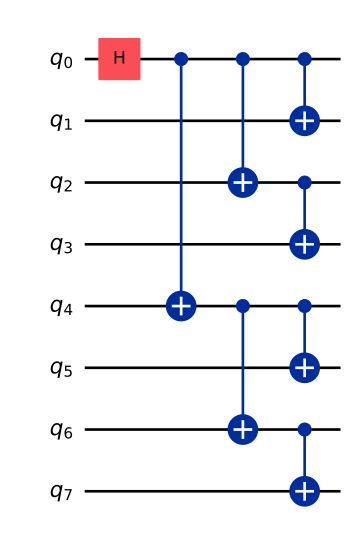
In this example, we prepare an 8-qubit GHZ state (similar to the zoned compiler) and map it to a hybrid NA architecture.
from qiskit import QuantumCircuit
# Build a compact GHZ(8) circuit (tree-like to keep depth small)

qc = QuantumCircuit(8)
qc.h(0)
qc.cx(0, 4)
qc.cx(0, 2)
qc.cx(4, 6)
qc.cx(0, 1)
qc.cx(2, 3)
qc.cx(4, 5)
qc.cx(6, 7)

qc.draw(output="mpl")
Load a hybrid NA architecture
The hybrid mapper expects an architecture specification in JSON. This repository ships several ready-to-use examples.
from pathlib import Path
import tempfile
import os
from mqt.qmap.hybrid_mapper import NeutralAtomHybridArchitecture

# Create a minimal architecture from an in-code JSON string and instantiate
# the NeutralAtomHybridArchitecture using a temporary file. The mapper's
# constructor expects a filename, so we write the JSON to a temp file first.
arch_json = '''{
  "name": "example arch",
  "properties": {
    "nRows": 5,
    "nColumns": 5,
    "nAods": 1,
    "nAodCoordinates": 1,
    "interQubitDistance": 10,
    "minimalAodDistance": 0.1,
    "interactionRadius": 1,
    "blockingFactor": 1
  },
  "parameters": {
    "nQubits": 10,
    "gateTimes": {
      "none": 0.5
    },
    "gateAverageFidelities": {
      "none": 0.999
    },
    "decoherenceTimes": {
      "t1": 100000000,
      "t2": 1500000
    },
    "shuttlingTimes": {
      "move": 0.55,
      "aod_move": 0.55,
      "aod_activate": 20,
      "aod_deactivate": 20
    },
    "shuttlingAverageFidelities": {
      "move": 1,
      "aod_move": 1,
      "aod_activate": 1,
      "aod_deactivate": 1
    }
  }
}'''

with tempfile.NamedTemporaryFile(mode="w", delete=False, suffix=".json") as _tmp:
    _tmp.write(arch_json)
    tmp_name = _tmp.name

arch = NeutralAtomHybridArchitecture(tmp_name)
# Clean up the temporary file
os.unlink(tmp_name)

print(f"Loaded architecture: {arch.name} with {arch.num_qubits} qubits.")
Loaded architecture: example arch with 10 qubits.
Map with HyRoNA
Mapping translates the algorithm to hardware-native operations using a combination of routing with SWAP/BRIDGE gates and atom moves. What combination is used depends on the architecture capabilities and the mapper parameters. Here, we show two examples: first, we only use gate-based routing, then we let the mapper decide freely.
from mqt.core import load
from mqt.qmap.hybrid_mapper import HybridNAMapper, MapperParameters

# Optional: tweak parameters (defaults are sensible for most cases)
params_shuttling = MapperParameters()
params_shuttling.gate_weight = 1.0
params_shuttling.shuttling_weight = 0.0  # disables atom moves


mapper = HybridNAMapper(arch, params=params_shuttling)

# Convert the Qiskit circuit to an MQT QuantumComputation and map it
circ = load(qc)
mapper.map(circ)  # optionally: mapper.map(circ, initial_mapping=InitialCircuitMapping.identity)

# Retrieve mapping statistics
mapper.get_stats()
{'nPassBy': 0.0,
 'nMoves': 0.0,
 'nFAncillas': 0.0,
 'nBridges': 1.0,
 'nSwaps': 5.0}
Note, how we set shuttling_weight zero to disallow atom moves and only use
SWAP gates for routing.
The idea of the hybrid mapper is to mix both capabilities or to automatically select the best one. We now re-run the mapping with default parameters that allow both SWAPs and atom moves.
params_default = MapperParameters()

mapper.set_parameters(params_default)

mapper.map(circ)
mapper.get_stats()
{'nPassBy': 3.0,
 'nMoves': 1.0,
 'nFAncillas': 0.0,
 'nBridges': 0.0,
 'nSwaps': 0.0}
Now the mapper uses atom moves only as they are the better option on this architecture where moves are unit fidelity and gates are noisy.
Schedule the mapped circuit
Scheduling orders the mapped operations as-soon-as-possible while respecting hardware constraints.
# Schedule; set create_animation_csv=True to generate visualization data
results = mapper.schedule(verbose=False, create_animation_csv=False)

results
{'nAodMove': 15.0,
 'nAodActivate': 4.0,
 'nCZs': 7.0,
 'totalFidelities': 0.9756324778196687,
 'totalGateFidelities': 0.9782294672887405,
 'totalIdleTime': 3928.545454545455,
 'totalExecutionTime': 437.22727272727275}
You can retrieve the mapped scheduled circuit (extended QASM2) and, if desired, the variant with explicit AOD movements equivalent to the operations done on the hardware.
mapped_qasm = mapper.get_mapped_qc_qasm()
# Print a snippet of the mapped QASM
print("\n... Mapped QASM snippet ...\n" +
    "\n".join(mapped_qasm.splitlines()[:30]))

# AOD-annotated variant (hardware-native moves)
mapped_aod_qasm = mapper.get_mapped_qc_aod_qasm()
print("\n... AOD (converted) snippet ...\n" + "\n".join(mapped_aod_qasm.splitlines()[:30]) + "\n...")
... Mapped QASM snippet ...
// i 0 1 2 3 4 5 6 7 8 9 10 11 12 13 14 15 16 17 18 19 20 21 22 23 24 25 26 27 28 29 30 31 32 33 34 35 36 37 38 39 40 41 42 43 44 45 46 47 48 49 50 51 52 53 54 55 56 57 58 59 60 61 62 63 64 65 66 67 68 69 70 71 72 73 74
// o 0 1 2 3 4 5 6 7 8 9 10 11 12 13 14 15 16 17 18 19 20 21 22 23 24 25 26 27 28 29 30 31 32 33 34 35 36 37 38 39 40 41 42 43 44 45 46 47 48 49 50 51 52 53 54 55 56 57 58 59 60 61 62 63 64 65 66 67 68 69 70 71 72 73 74
OPENQASM 2.0;
include "qelib1.inc";
qreg q[25];
qreg anc[25];
qreg fa[25];
h q[0];
h q[1];
h q[2];
h q[3];
h q[4];
h q[5];
h q[6];
h q[7];
cz q[0], q[1];
h q[1];
move q[0], anc[3];
cz anc[3], q[4];
move anc[3], q[0];
h q[4];
move q[4], q[11];
cz q[11], q[6];
h q[6];
cz q[6], q[7];
h q[7];
move q[11], anc[10];
cz anc[10], q[5];
move anc[10], q[11];
h q[5];

... AOD (converted) snippet ...
// i 0 1 2 3 4 5 6 7 8 9 10 11 12 13 14 15 16 17 18 19 20 21 22 23 24 25 26 27 28 29 30 31 32 33 34 35 36 37 38 39 40 41 42 43 44 45 46 47 48 49 50 51 52 53 54 55 56 57 58 59 60 61 62 63 64 65 66 67 68 69 70 71 72 73 74
// o 0 1 2 3 4 5 6 7 8 9 10 11 12 13 14 15 16 17 18 19 20 21 22 23 24 25 26 27 28 29 30 31 32 33 34 35 36 37 38 39 40 41 42 43 44 45 46 47 48 49 50 51 52 53 54 55 56 57 58 59 60 61 62 63 64 65 66 67 68 69 70 71 72 73 74
OPENQASM 2.0;
include "qelib1.inc";
qreg q[25];
qreg anc[25];
qreg fa[25];
h q[0];
h q[1];
h q[2];
h q[3];
h q[4];
h q[5];
h q[6];
h q[7];
cz q[0], q[1];
h q[1];
aod_activate (0, 0, 0; 1, 0, 0) q[0];
aod_move (0, 0, 0.1; 1, 0, 0.1) q[0], q[0];
aod_move (0, 0.1, 29.9) q[0], anc[3];
cz anc[3], q[4];
aod_move (0, 29.9, 0.1) anc[3], q[0];
aod_move (0, 0.1, 0; 1, 0.1, 0) q[0], q[0];
aod_deactivate (0, 0, 0; 1, 0, 0) q[0];
h q[4];
aod_activate (0, 40, 40; 1, 0, 0) q[4];
aod_move (0, 40, 39.9; 1, 0, 0.1) q[4], q[4];
aod_move (0, 39.9, 10.1; 1, 0.1, 19.9) q[4], q[11];
aod_move (0, 10.1, 10; 1, 19.9, 20) q[11], q[11];
aod_deactivate (0, 10, 10; 1, 20, 20) q[11];
...
Here, the q register corresponds to the 5x5=25 coordinates of the architecture
and no longer to the circuit qubits. The other registers are used for temporary
storage and AOD control.
The second variant shows explicit AOD movements that correspond to the atom moves done on hardware. Here, the AODs can be activated, moved, and deactivated to shuttle atoms around. The first entry corresponds to the x-direction and the second to the y-direction; in each pair, the two numbers denote start and end coordinates.
Export animation files (optional)
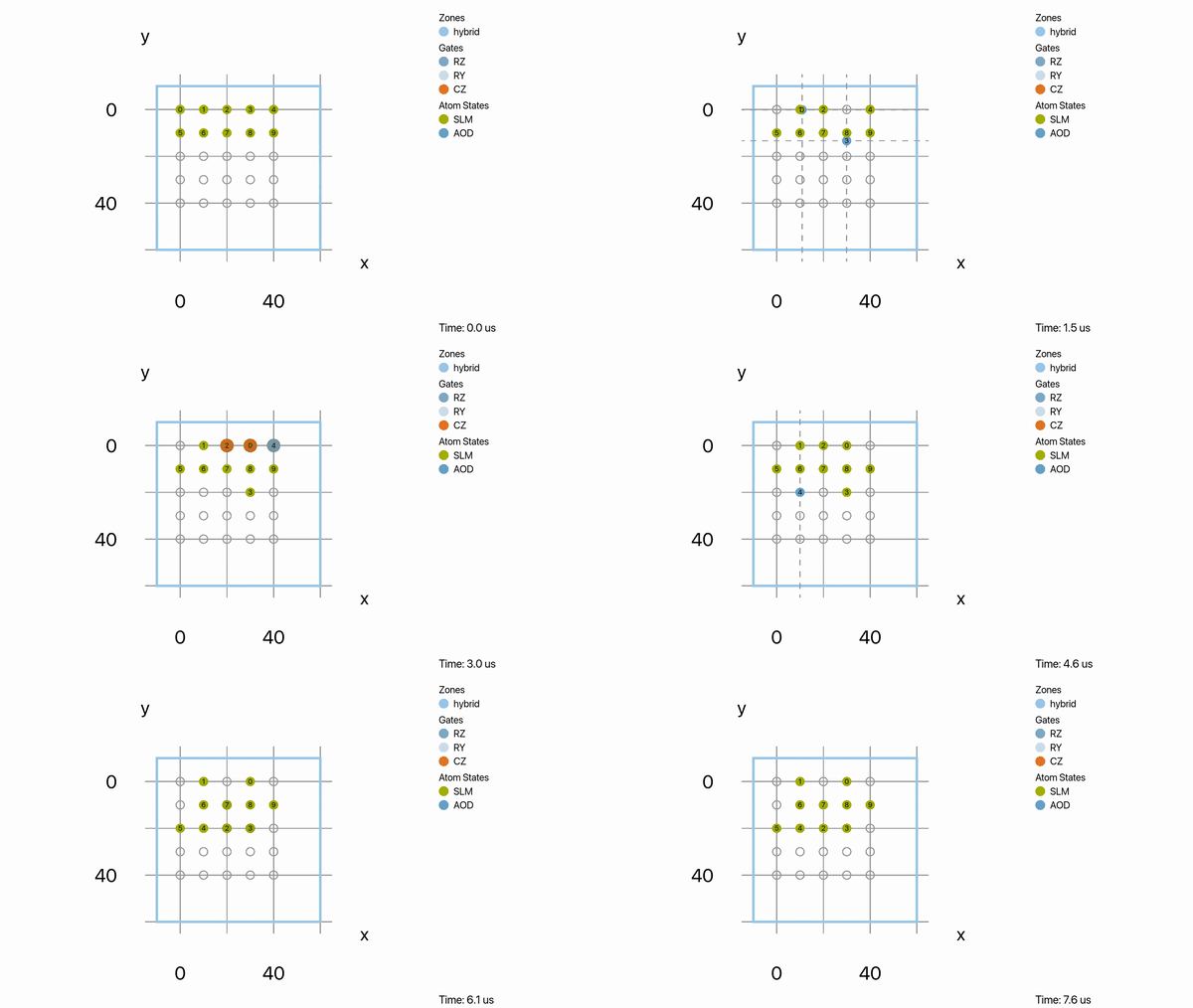
HyRoNA can write animation output files that can be visualized with
MQT NAViz. Typically one has
to accelerate the shuttling speed for better visualization by setting
shuttling_speed_factor.
# Re-run scheduling with animation output enabled
_ = mapper.schedule(verbose=False, create_animation_csv=True, shuttling_speed_factor=100)

# Save the files; the method writes `.naviz` and `.namachine` files
# next to the given base name
mapper.save_animation_files("ghz8_hyrona_animation")
[2026-08-10 05:19:36.241] [warning] [NeutralAtomArchitecture.hpp:355] Gate time for 'x' not found. Returning default value.
[2026-08-10 05:19:36.241] [warning] [NeutralAtomArchitecture.hpp:355] Gate time for 'x' not found. Returning default value.
This creates .namachine and .naviz files which can then be imported into MQT
NAViz for visualization.
Tuning the mapper
HyRoNA exposes a concise set of parameters via MapperParameters:
lookahead_depth: limited lookahead to peek at near-future layers
lookahead_weight_swaps / lookahead_weight_moves: balance gate-routing vs. atom motion during lookahead
decay: decreases the incentive for repeatedly blocking the same qubits
gate_weight / shuttling_weight / shuttling_time_weight: cost-model weights for gates vs. transport
dynamic_mapping_weight: bias for enabling dynamic re-mapping (SWAP/MOVE) when beneficial
max_bridge_distance: limit for BRIDGE operations; use to avoid long-range chains
initial_coord_mapping: strategy for hardware coordinate initialization
For more details, please check the source code documentation of
MapperParameters.
Tips
Initial mapping: you can explicitly select the initial circuit-to-hardware mapping for
mapormap_qasm_fileusinginitial_mapping=InitialCircuitMapping.identityorInitialCircuitMapping.graph.QASM input: instead of building a circuit in Qiskit, you can call
mapper.map_qasm_file("path/to/circuit.qasm")and thenmapper.schedule(...)as shown above.Architectures: the examples
rubidium_hybrid.json,rubidium_gate.json, andrubidium_shuttling.jsoninarchitectures/cover different capability profiles and are a good starting point
Hybrid Synthesis Mapper
The Hybrid Synthesis Mapper helps you compare and stitch together alternative circuit fragments while keeping track of the current mapping on the NA device. Below is a compact example that mirrors the unit test flow and shows how to:
evaluate multiple candidate fragments and pick the best,
append fragments,
and retrieve mapped QASM as well as the AOD-annotated variant.
First, we create the HybridSynthesisMapper and evaluate two candidate
fragments (here, both are the same GHZ circuit as above for simplicity).
from mqt.qmap.hybrid_mapper import HybridSynthesisMapper

# Reuse the architecture `arch` and GHZ circuit `qc` defined above.
synth = HybridSynthesisMapper(arch)
synth.init_mapping(qc.num_qubits)

fidelities = synth.evaluate_synthesis_steps([circ, circ], also_map = False)
print("Fidelities of subcircuits:", fidelities )
Fidelities of subcircuits: [0.9755452782076449, 0.9755452782076449]
The fidelity return indicates how well the subcircuit can be appended to the circuit mapped to the hardware.
You can then build up a larger program by appending fragments.
synth.append_with_mapping(circ)
This appends the circuit and maps it directly. This can be repeated for multiple fragments to always choose the best one.
Similar to the normal Hybrid Mapper, you can retrieve the mapped circuit and the AOD-annotated variant:
# Retrieve mapped circuit (extended QASM2)
qasm_mapped = synth.get_mapped_qc_qasm()
print("\n... Mapped QASM snippet ...\n" +
    "\n".join(qasm_mapped.splitlines()[:30]) +
    "\n...")
... Mapped QASM snippet ...
// i 0 1 2 3 4 5 6 7 8 9 10 11 12 13 14 15 16 17 18 19 20 21 22 23 24 25 26 27 28 29 30 31 32 33 34 35 36 37 38 39 40 41 42 43 44 45 46 47 48 49 50 51 52 53 54 55 56 57 58 59 60 61 62 63 64 65 66 67 68 69 70 71 72 73 74
// o 0 1 2 3 4 5 6 7 8 9 10 11 12 13 14 15 16 17 18 19 20 21 22 23 24 25 26 27 28 29 30 31 32 33 34 35 36 37 38 39 40 41 42 43 44 45 46 47 48 49 50 51 52 53 54 55 56 57 58 59 60 61 62 63 64 65 66 67 68 69 70 71 72 73 74
OPENQASM 2.0;
include "qelib1.inc";
qreg q[25];
qreg anc[25];
qreg fa[25];
h q[0];
h q[1];
h q[2];
h q[3];
h q[4];
h q[5];
h q[6];
h q[7];
cz q[0], q[1];
h q[1];
move q[0], anc[3];
cz anc[3], q[4];
move anc[3], q[0];
h q[4];
move q[4], q[11];
cz q[11], q[6];
h q[6];
cz q[6], q[7];
h q[7];
move q[11], anc[10];
cz anc[10], q[5];
move anc[10], q[11];
h q[5];
...
One can also access the circuits which is constructed step-by-step in a unmapped state (e.g. to use a different mapper).
qasm_synth = synth.get_synthesized_qc_qasm()
print("\n... Synthesized QASM snippet ...\n" +
    "\n".join(qasm_synth.splitlines()[:30]) +
    "\n...")
... Synthesized QASM snippet ...
// i 0 1 2 3 4 5 6 7
// o 0 1 2 3 4 5 6 7
OPENQASM 2.0;
include "qelib1.inc";
qreg q[8];
h q[0];
h q[4];
cz q[0], q[4];
h q[4];
h q[2];
cz q[0], q[2];
h q[2];
h q[6];
cz q[4], q[6];
h q[6];
h q[1];
cz q[0], q[1];
h q[1];
h q[3];
cz q[2], q[3];
h q[3];
h q[5];
cz q[4], q[5];
h q[5];
h q[7];
cz q[6], q[7];
h q[7];
...
Here this corresponds simply to the input GHZ circuit.
This workflow lets you mix candidate-generation (synthesis) with hardware-aware mapping and scheduling, while keeping a single source of truth for mapping state across fragments.