MQT Core IR
The central interface for working with quantum computations throughout the
Munich Quantum Toolkit is the QuantumComputation class.
It effectively represents quantum computations as sequential lists of operation,
similar to Qiskit’s QuantumCircuit class.
The following will demonstrate how to work with the
QuantumComputation class in Python.
Note
MQT Core is primarily designed in C++ with a thin Python wrapper. Historically, the C++ part of MQT Core was the focus and the Python interface was added later. As the standards we hold ourselves to have evolved, the Python interface is much better documented than the C++ interface. Contributions to the C++ documentation are welcome. See the contribution guidelines for more information.
Quickstart
The following code snippet demonstrates how to construct a quantum computation for an instance of the Iterative Quantum Phase Estimation algorithm that aims to estimate the phase of a unitary operator \(U=p(3\pi/8)\) using 3 bits of precision.
 1from mqt.core.ir import QuantumComputation
 2from mqt.core.ir.operations import OpType
 3
 4from math import pi
 5
 6theta = 3 * pi / 8
 7precision = 3
 8
 9# Create an empty quantum computation
10qc = QuantumComputation()
11
12# Counting register
13q = qc.add_qubit_register(1, "q")
14
15# Eigenstate register
16psi = qc.add_qubit_register(1, "psi")
17
18# Classical register for the result, the estimated phase is `0.c_2 c_1 c_0 * pi`
19c = qc.add_classical_register(precision, "c")
20
21# Prepare psi in the eigenstate |1>
22qc.x(psi[0])
23
24for i in range(precision):
25  # Hadamard on the working qubit
26  qc.h(q[0])
27
28  # Controlled phase gate
29  qc.cp(2**(precision - i - 1) * theta, q[0], psi[0])
30
31  # Iterative inverse QFT
32  for j in range(i):
33    qc.if_(op_type=OpType.p, target=q[0], control_bit=c[j], params=[-pi / 2**(i - j)])
34  qc.h(q[0])
35
36  # Measure the result
37  qc.measure(q[0], c[i])
38
39  # Reset the qubit if not finished
40  if i < precision - 1:
41    qc.reset(q[0])
The circuit class provides lots of flexibility when it comes to the kind of
gates that can be applied. Check out the full API documentation of the
QuantumComputation class for more details.
Visualizing Circuits
Circuits can be printed in a human-readable, text-based format. The output is to be read from top to bottom and left to right. Each line represents a single operation in the circuit.
Note
The first and last lines have a special meaning: the first line contains the initial layout information, while the last line contains the output permutation. This is explained in more detail in the Layout Information section.
1print(qc)
 i:   0   1
 1:   |   x
 2:   h   |
 3:   c   p  p: (4.71239)
 4:   h   |
 5:   0   |
 6: rst   |
 7:   h   |
 8:   c   p  p: (2.35619)
 9:   if (c[0]) {
    sdg   |
     }
10:   h   |
11:   1   |
12: rst   |
13:   h   |
14:   c   p  p: (1.1781)
15:   if (c[0]) {
    tdg   |
     }
16:   if (c[1]) {
    sdg   |
     }
17:   h   |
18:   2   |
 o:   0   1
Circuits can also easily be exported to OpenQASM 3 using the
qasm3_str() method.
1print(qc.qasm3_str())
// i 0 1
// o 0 1
OPENQASM 3.0;
include "stdgates.inc";
qubit[1] q;
qubit[1] psi;
bit[3] c;
x psi[0];
h q[0];
cp(4.71238898038469) q[0], psi[0];
h q[0];
c[0] = measure q[0];
reset q;
h q[0];
cp(2.35619449019234) q[0], psi[0];
if (c[0]) {
  sdg q[0];
}
h q[0];
c[1] = measure q[0];
reset q;
h q[0];
cp(1.17809724509617) q[0], psi[0];
if (c[0]) {
  tdg q[0];
}
if (c[1]) {
  sdg q[0];
}
h q[0];
c[2] = measure q[0];
Layout Information
When compiling a quantum circuit for a specific quantum device, it is necessary to map the qubits of the circuit to the qubits of the device. In addition, SWAP operations might be necessary to ensure that gates are only applied to qubits connected on the device. These SWAP operations permute the assignment of circuit qubits to device qubits. At the end of the computation, the values of the circuit qubits are measured at specific device qubits. This kind of layout information is important for reasoning about the functionality of the compiled circuit. As such, preserving this information is essential for verification and debugging purposes.
Note
In the literature, the qubits used in the circuit are often referred to as logical qubits or virtual qubits, while the qubits of the device are also called physical qubits. Within the MQT, we try to avoid the terms logical and physical qubits, as they can be misleading due to the connection to error correction. Instead, we use the terms circuit qubits and device qubits.
To this end, the QuantumComputation class contains two
members, initial_layout and
output_permutation, which are
instances of the Permutation class. The initial layout
tracks the mapping of circuit qubits to device qubits at the beginning of the
computation, while the output permutation tracks where a particular circuit
qubit is measured at the end of the computation. While the output permutation
can generally be inferred from the measurements in the circuit (using
initialize_io_mapping()), the initial
layout is not always clear. OpenQASM, for example, lacks a way to express the
initial layout of a circuit and preserve this information. Therefore, MQT Core
will output the layout information as comments in the first two lines of the
QASM string using the following format:
// i Q_0, Q_1, ..., Q_n, meaning circuit qubit \(i\) is mapped to device qubit \(Q_i\).// o Q_0, Q_1, ..., Q_nmeaning the value of circuit qubit \(i\) (assumed to be stored in classical bit \(c[i]\)) is measured at device qubit \(Q_i\).
An example illustrates the idea:
 1# 3 qubits, 3 classical bits
 2qc = QuantumComputation(3, 3)
 3
 4qc.h(0)
 5qc.x(1)
 6qc.s(2)
 7
 8# c[0] is measured at device qubit 1
 9qc.measure(1, 0)
10# c[1] is measured at device qubit 2
11qc.measure(2, 1)
12# c[2] is measured at device qubit 0
13qc.measure(0, 2)
14
15# determine permutation from measurement
16qc.initialize_io_mapping()
17
18print(qc.qasm3_str())
// i 0 1 2
// o 1 2 0
OPENQASM 3.0;
include "stdgates.inc";
qubit[3] q;
bit[3] c;
h q[0];
x q[1];
s q[2];
c[0] = measure q[1];
c[1] = measure q[2];
c[2] = measure q[0];
In the example above, the initial layout is not explicitly specified. A trivial layout is thus assumed, where the circuit qubits are mapped to the device qubits in order. The output permutation is determined from the measurements and is printed as comments in the QASM string.
Note
This layout information is not part of the OpenQASM 3 standard. It is a feature of MQT Core to help with debugging and verification. MQT Core’s QASM export will always include this layout information in the first two lines of the QASM string. MQT Core’s QASM import will parse these lines and set the initial layout and output permutation accordingly.
Operations
The operations in a QuantumComputation object are of
type Operation. Every type of operation in
mqt-core is derived from this class. Operations can also be explicitly
constructed. Each Operation has a type in
the form of an OpType.
StandardOperation
A StandardOperation is used to represent
basic unitary gates. These can also be declared with arbitrarily many controls.
 1from mqt.core.ir.operations import OpType, StandardOperation, Control
 2
 3# u3 gate on qubit 0
 4u_gate = StandardOperation(target=0, params=[pi / 4, pi, -pi / 2], op_type=OpType.u)
 5
 6# controlled x-rotation
 7crx = StandardOperation(control=Control(0), target=1, params=[pi], op_type=OpType.rx)
 8
 9# multi-controlled x-gate
10mcx = StandardOperation(controls={Control(0), Control(1)}, target=2, op_type=OpType.x)
11
12# add operations to a quantum computation
13qc = QuantumComputation(3)
14qc.append(u_gate)
15qc.append(crx)
16qc.append(mcx)
17
18print(qc)
i:   0   1   2
1:   u   |   |  p: (0.785398) (3.14159) (-1.5708)
2:   c  rx   |  p: (3.14159)
3:   c   c   x
o:   0   1   2
NonUnitaryOperation
A NonUnitaryOperation is used to represent
operations involving measurements or resets.
 1from mqt.core.ir.operations import NonUnitaryOperation
 2
 3nqubits = 2
 4qc = QuantumComputation(nqubits, nqubits)
 5qc.h(0)
 6
 7# measure qubit 0 on classical bit 0
 8meas_0 = NonUnitaryOperation(target=0, classic=0)
 9
10# reset all qubits
11reset = NonUnitaryOperation(targets=[0, 1], op_type=OpType.reset)
12
13qc.append(meas_0)
14qc.append(reset)
15
16print(qc)
i:   0   1
1:   h   |
2:   0   |
3: rst rst
o:   0   1
SymbolicOperation
A SymbolicOperation can represent all gates
of a StandardOperation but the gate
parameters can be symbolic. Symbolic expressions are represented in MQT using
the Expression type, which represent linear
combinations of symbolic Term objects over
some set of Variable objects.
 1from mqt.core.ir.operations import SymbolicOperation
 2from mqt.core.ir.symbolic import Expression, Term, Variable
 3
 4x = Variable("x")
 5y = Variable("y")
 6sym = Expression([Term(x, 2), Term(y, 3)])
 7print(sym)
 8
 9sym += 1
10print(sym)
11
12# Create symbolic gate
13u1_symb = SymbolicOperation(target=0, params=[sym], op_type=OpType.p)
14
15# Mixed symbolic and instantiated parameters
16u2_symb = SymbolicOperation(target=0, params=[sym, 2.0], op_type=OpType.u2)
2*x + 3*y + 0
2*x + 3*y + 1
CompoundOperation
A CompoundOperation bundles multiple
Operation objects together.
 1from mqt.core.ir.operations import CompoundOperation
 2
 3comp_op = CompoundOperation()
 4
 5# create bell pair circuit
 6comp_op.append(StandardOperation(0, op_type=OpType.h))
 7comp_op.append(StandardOperation(target=0, control=Control(1), op_type=OpType.x))
 8
 9qc = QuantumComputation(2)
10qc.append(comp_op)
11
12print(qc)
i:   0   1
1:--------
 :   h   |
 :   x   c
 ---------
o:   0   1
Circuits can be conveniently turned into operations which allows to create nested circuits:
1nqubits = 2
2comp = QuantumComputation(nqubits)
3comp.h(0)
4comp.cx(0, 1)
5
6qc = QuantumComputation(nqubits)
7qc.append(comp.to_operation())
8
9print(qc)
i:   0   1
1:--------
 :   h   |
 :   c   x
 ---------
o:   0   1
IfElseOperation
A IfElseOperation is an operation controlled
by a classical bit or a classical register. If a given condition is met, the
then_operation is applied. If
the condition is not met, the
else_operation is applied.
 1qc = QuantumComputation(1, 1)
 2
 3qc.h(0)
 4qc.measure(0, 0)
 5qc.if_else(
 6    then_operation=StandardOperation(target=0, op_type=OpType.x),
 7    else_operation=StandardOperation(target=0, op_type=OpType.y),
 8    control_bit=0,
 9)
10
11print(qc)
i:   0
1:   h
2:   0
3:  if (c[0]) {
     x
    } else {
     y
    }
o:   0
If you do not need an else_operation, the
QuantumComputation class provides a shortcut for
creating an if_() operation.
1qc = QuantumComputation(1, 1)
2
3qc.h(0)
4qc.measure(0, 0)
5qc.if_(op_type=OpType.x, target=0, control_bit=0)
6
7print(qc)
i:   0
1:   h
2:   0
3:  if (c[0]) {
     x
    }
o:   0
Interfacing with other SDKs and Formats
OpenQASM
OpenQASM is a widely used format for representing quantum circuits. Its latest version, OpenQASM 3, is a powerful language that can express a wide range of quantum circuits. MQT Core supports the full functionality of OpenQASM 2.0 (including classically controlled operations) and a growing subset of OpenQASM 3.
 1from mqt.core.ir import QuantumComputation
 2
 3qasm_str = """
 4OPENQASM 3.0;
 5include "stdgates.inc";
 6qubit[3] q;
 7h q[0];
 8cx q[0], q[1];
 9cx q[0], q[2];
10"""
11
12qc = QuantumComputation.from_qasm_str(qasm_str)
13
14print(qc)
i:   0   1   2
1:   h   |   |
2:   c   x   |
3:   c   |   x
o:   0   1   2
Qiskit
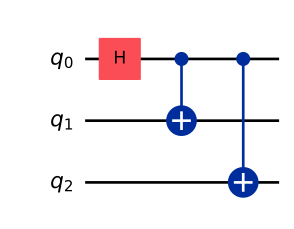
In addition to OpenQASM, mqt-core can natively import
Qiskit QuantumCircuit
objects.
1from qiskit import QuantumCircuit
2
3# GHZ circuit in qiskit
4qiskit_qc = QuantumCircuit(3)
5qiskit_qc.h(0)
6qiskit_qc.cx(0, 1)
7qiskit_qc.cx(0, 2)
8
9qiskit_qc.draw(output="mpl", style="iqp")
1from mqt.core.plugins.qiskit import qiskit_to_mqt
2
3mqt_qc = qiskit_to_mqt(qiskit_qc)
4print(mqt_qc)
circuit-41
i:   0   1   2
1:   h   |   |
2:   c   x   |
3:   c   |   x
o:   0   1   2