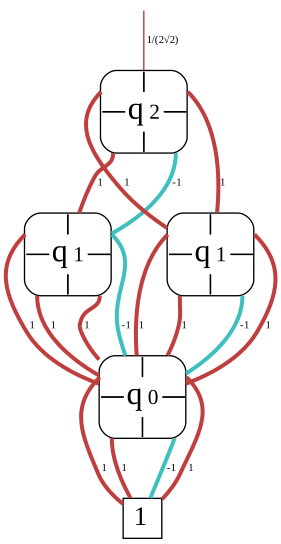
Unitary Simulator
The Unitary Simulator uses the same underlying techniques as the Circuit Simulator, but instead of computing the final state vector, it computes the unitary matrix that represents the (functionality of the) quantum circuit. Specifically, given a quantum circuit \(G=g_0g_1\ldots g_{|G|-1}\), the unitary simulator computes the matrix \(U=U_{{|G|-1}}\ldots U_{1}U_{0}\), where \(U_g\) is the unitary matrix that represents the functionality of the gate \(g\).
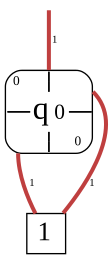
To this end, it starts off with the decision diagram representation of the identity \(I\) (which is maximally compact as a decision diagram) and then applies the gates of the circuit one by one. The DD representation of the unitary is updated in each step. The final result is a decision diagram that represents the unitary matrix \(U\). Note that, by definition, this simulator can only handle circuits composed of unitary operations.
In general, the unitary matrix for an \(n\)-qubit circuit is a \(2^n \times 2^n\) matrix. The decision diagram representation of such a matrix can be exponentially more compact than the full matrix representation. Hence, as the other simulators, the unitary simulator can take advantage of the decision diagram representation to efficiently compute a representation of the functionality of the quantum circuit, even in cases where the full matrix representation would be infeasible due to its exponential size.
Computing a simple unitary
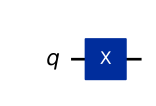
Let us start by computing the unitary matrix of a simple quantum circuit. Out of convenience, the following will use the QuantumCircuit class from Qiskit to define the circuit.
However, the unitary simulator generally accepts the same input types as all other simulators (e.g., OpenQASM).
1from qiskit import QuantumCircuit
2
3qc = QuantumCircuit(1)
4qc.x(0)
5
6qc.draw(output="mpl", style="iqp")
 1import graphviz
 2from mqt.core import load
 3
 4from mqt.ddsim import UnitarySimulator
 5
 6# Create the simulator
 7circ = load(qc)
 8sim = UnitarySimulator(circ)
 9
10# Construct the decision diagram representation of the unitary
11sim.construct()
12
13# Get the decision diagram representation of the unitary
14dd = sim.get_constructed_dd()
15dot = dd.to_dot(colored=True, edge_labels=True, classic=False)
16
17graphviz.Source(source=dot)
1import numpy as np
2
3# Get the matrix representation of the unitary
4mat = dd.get_matrix(qc.num_qubits)
5unitary = np.array(mat, copy=False)
6
7print(unitary)
[[0.+0.j 1.+0.j]
 [1.+0.j 0.+0.j]]
Examples
The following examples demonstrate a couple of different aspects about the unitary simulator.
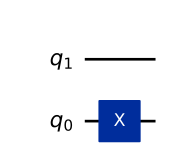
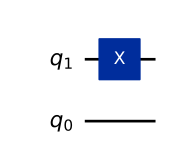
Multiple qubits and qubit ordering
1from qiskit import QuantumCircuit
2
3qc = QuantumCircuit(2)
4qc.x(0)
5
6qc.draw(output="mpl", style="iqp", wire_order=[1, 0])
 1import graphviz
 2from mqt.core import load
 3
 4from mqt.ddsim import UnitarySimulator
 5
 6# Create the simulator
 7circ = load(qc)
 8sim = UnitarySimulator(circ)
 9
10# Construct the decision diagram representation of the unitary
11sim.construct()
12
13# Get the decision diagram representation of the unitary
14dd = sim.get_constructed_dd()
15dot = dd.to_dot(colored=True, edge_labels=True, classic=False)
16
17graphviz.Source(source=dot)
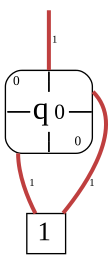
1import numpy as np
2
3mat = dd.get_matrix(qc.num_qubits)
4unitary = np.array(mat, copy=False)
5
6unitary
array([[0.+0.j, 1.+0.j, 0.+0.j, 0.+0.j],
       [1.+0.j, 0.+0.j, 0.+0.j, 0.+0.j],
       [0.+0.j, 0.+0.j, 0.+0.j, 1.+0.j],
       [0.+0.j, 0.+0.j, 1.+0.j, 0.+0.j]])
Now, consider applying the gate to the other qubit instead.
1from qiskit import QuantumCircuit
2
3qc = QuantumCircuit(2)
4qc.x(1)
5
6qc.draw(output="mpl", style="iqp", wire_order=[1, 0])
 1import graphviz
 2from mqt.core import load
 3
 4from mqt.ddsim import UnitarySimulator
 5
 6# Create the simulator
 7circ = load(qc)
 8sim = UnitarySimulator(circ)
 9
10# Construct the decision diagram representation of the unitary
11sim.construct()
12
13# Get the decision diagram representation of the unitary
14dd = sim.get_constructed_dd()
15dot = dd.to_dot(colored=True, edge_labels=True, classic=False)
16
17graphviz.Source(source=dot)
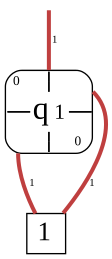
1import numpy as np
2
3mat = dd.get_matrix(qc.num_qubits)
4unitary = np.array(mat, copy=False)
5
6unitary
array([[0.+0.j, 0.+0.j, 1.+0.j, 0.+0.j],
       [0.+0.j, 0.+0.j, 0.+0.j, 1.+0.j],
       [1.+0.j, 0.+0.j, 0.+0.j, 0.+0.j],
       [0.+0.j, 1.+0.j, 0.+0.j, 0.+0.j]])
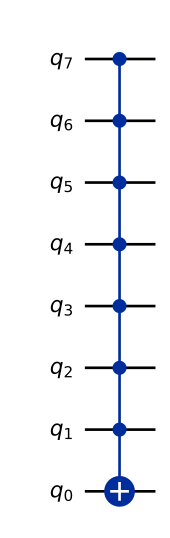
Multi-controlled quantum operations
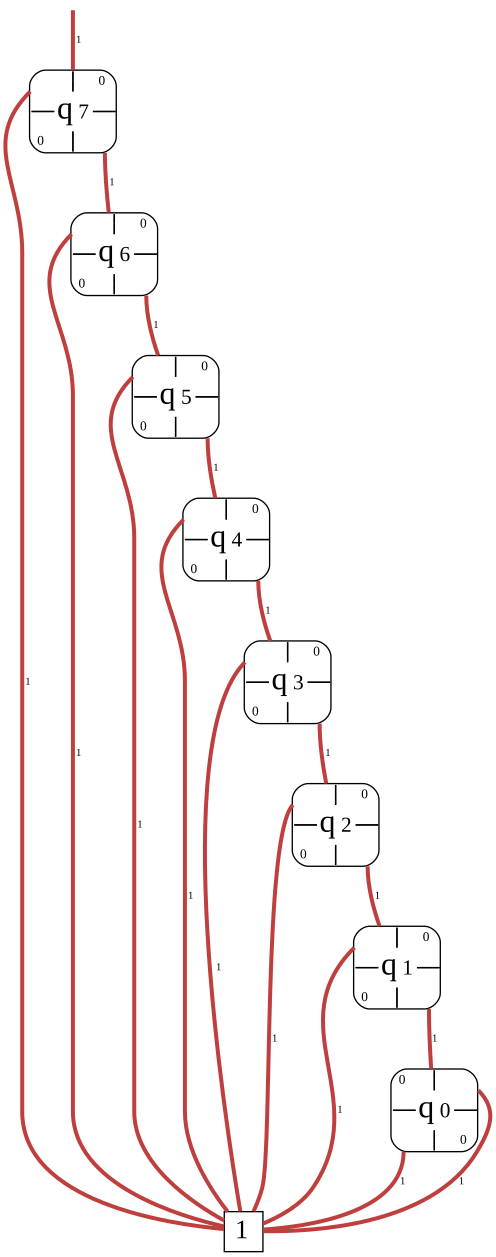
The following shows an example of how efficiently decision diagrams can represent multi-controlled quantum operations.
1from qiskit import QuantumCircuit
2
3num_qubits = 8
4qc = QuantumCircuit(num_qubits)
5qc.mcx(control_qubits=list(reversed(range(1, num_qubits))), target_qubit=0)
6
7qc.draw(output="mpl", style="iqp", wire_order=list(reversed(range(num_qubits))))
 1import graphviz
 2from mqt.core import load
 3
 4from mqt.ddsim import UnitarySimulator
 5
 6# Create the simulator
 7circ = load(qc)
 8sim = UnitarySimulator(circ)
 9
10# Construct the decision diagram representation of the unitary
11sim.construct()
12
13# Get the decision diagram representation of the unitary
14dd = sim.get_constructed_dd()
15dot = dd.to_dot(colored=True, edge_labels=True, classic=False)
16
17graphviz.Source(source=dot)
1import numpy as np
2
3mat = dd.get_matrix(qc.num_qubits)
4unitary = np.array(mat, copy=False)
5
6unitary
array([[1.+0.j, 0.+0.j, 0.+0.j, ..., 0.+0.j, 0.+0.j, 0.+0.j],
       [0.+0.j, 1.+0.j, 0.+0.j, ..., 0.+0.j, 0.+0.j, 0.+0.j],
       [0.+0.j, 0.+0.j, 1.+0.j, ..., 0.+0.j, 0.+0.j, 0.+0.j],
       ...,
       [0.+0.j, 0.+0.j, 0.+0.j, ..., 1.+0.j, 0.+0.j, 0.+0.j],
       [0.+0.j, 0.+0.j, 0.+0.j, ..., 0.+0.j, 0.+0.j, 1.+0.j],
       [0.+0.j, 0.+0.j, 0.+0.j, ..., 0.+0.j, 1.+0.j, 0.+0.j]],
      shape=(256, 256))
Unitary of a complete circuit
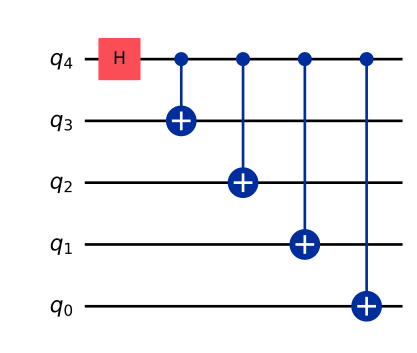
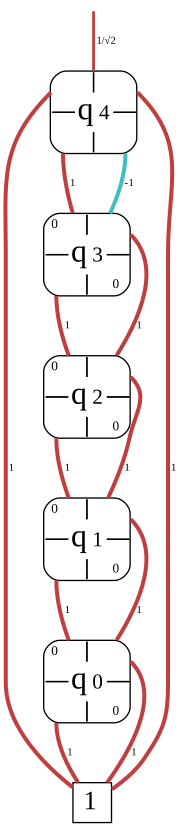
The following computes the unitary for a circuit consisting of multiple gates.
1from qiskit import QuantumCircuit
2
3num_qubits = 5
4qc = QuantumCircuit(num_qubits)
5qc.h(num_qubits - 1)
6for i in reversed(range(num_qubits - 1)):
7    qc.cx(num_qubits - 1, i)
8
9qc.draw(output="mpl", style="iqp", wire_order=list(reversed(range(num_qubits))))
 1import graphviz
 2from mqt.core import load
 3
 4from mqt.ddsim import UnitarySimulator
 5
 6# Create the simulator
 7circ = load(qc)
 8sim = UnitarySimulator(circ)
 9
10# Construct the decision diagram representation of the unitary
11sim.construct()
12
13# Get the decision diagram representation of the unitary
14dd = sim.get_constructed_dd()
15dot = dd.to_dot(colored=True, edge_labels=True, classic=False)
16
17graphviz.Source(source=dot)
1import numpy as np
2
3mat = dd.get_matrix(qc.num_qubits)
4unitary = np.array(mat, copy=False)
5
6unitary
array([[0.70710678+0.j, 0.        +0.j, 0.        +0.j, ...,
        0.        +0.j, 0.        +0.j, 0.        +0.j],
       [0.        +0.j, 0.70710678+0.j, 0.        +0.j, ...,
        0.        +0.j, 0.        +0.j, 0.        +0.j],
       [0.        +0.j, 0.        +0.j, 0.70710678+0.j, ...,
        0.        +0.j, 0.        +0.j, 0.        +0.j],
       ...,
       [0.        +0.j, 0.        +0.j, 0.70710678+0.j, ...,
        0.        +0.j, 0.        +0.j, 0.        +0.j],
       [0.        +0.j, 0.70710678+0.j, 0.        +0.j, ...,
        0.        +0.j, 0.        +0.j, 0.        +0.j],
       [0.70710678+0.j, 0.        +0.j, 0.        +0.j, ...,
        0.        +0.j, 0.        +0.j, 0.        +0.j]], shape=(32, 32))
Decision diagrams are not always compact
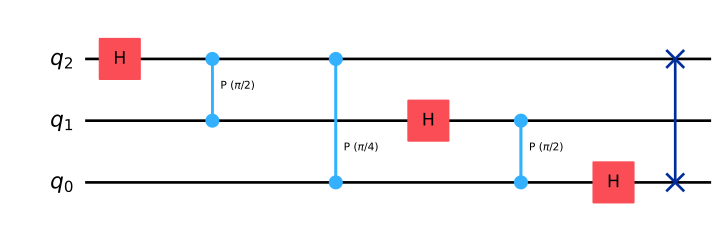
The following example aims to demonstrate that decision diagrams are not a holy grail to constructing unitaries for circuits. In the worst case, they are still exponentially large. At that point, a plain array representation most likely becomes more performant.
 1import numpy as np
 2from qiskit import QuantumCircuit
 3
 4qc = QuantumCircuit(3)
 5qc.h(2)
 6qc.cp(np.pi / 2, 1, 2)
 7qc.cp(np.pi / 4, 0, 2)
 8qc.h(1)
 9qc.cp(np.pi / 2, 0, 1)
10qc.h(0)
11qc.swap(0, 2)
12
13qc.draw(output="mpl", style="iqp", wire_order=[2, 1, 0])
 1import graphviz
 2from mqt.core import load
 3
 4from mqt.ddsim import UnitarySimulator
 5
 6# Create the simulator
 7circ = load(qc)
 8sim = UnitarySimulator(circ)
 9
10# Construct the decision diagram representation of the unitary
11sim.construct()
12
13# Get the decision diagram representation of the unitary
14dd = sim.get_constructed_dd()
15dot = dd.to_dot(colored=True, edge_labels=True, classic=False)
16
17graphviz.Source(source=dot)

1import numpy as np
2
3mat = dd.get_matrix(qc.num_qubits)
4unitary = np.array(mat, copy=False)
5
6unitary
array([[ 0.35355339+0.j        ,  0.35355339+0.j        ,
         0.35355339+0.j        ,  0.35355339+0.j        ,
         0.35355339+0.j        ,  0.35355339+0.j        ,
         0.35355339+0.j        ,  0.35355339+0.j        ],
       [ 0.35355339+0.j        ,  0.25      +0.25j      ,
         0.        +0.35355339j, -0.25      +0.25j      ,
        -0.35355339+0.j        , -0.25      -0.25j      ,
         0.        -0.35355339j,  0.25      -0.25j      ],
       [ 0.35355339+0.j        ,  0.        +0.35355339j,
        -0.35355339+0.j        , -0.        -0.35355339j,
         0.35355339+0.j        ,  0.        +0.35355339j,
        -0.35355339+0.j        , -0.        -0.35355339j],
       [ 0.35355339+0.j        , -0.25      +0.25j      ,
        -0.        -0.35355339j,  0.25      +0.25j      ,
        -0.35355339+0.j        ,  0.25      -0.25j      ,
         0.        +0.35355339j, -0.25      -0.25j      ],
       [ 0.35355339+0.j        , -0.35355339+0.j        ,
         0.35355339+0.j        , -0.35355339+0.j        ,
         0.35355339+0.j        , -0.35355339+0.j        ,
         0.35355339+0.j        , -0.35355339+0.j        ],
       [ 0.35355339+0.j        , -0.25      -0.25j      ,
         0.        +0.35355339j,  0.25      -0.25j      ,
        -0.35355339+0.j        ,  0.25      +0.25j      ,
         0.        -0.35355339j, -0.25      +0.25j      ],
       [ 0.35355339+0.j        ,  0.        -0.35355339j,
        -0.35355339+0.j        ,  0.        +0.35355339j,
         0.35355339+0.j        ,  0.        -0.35355339j,
        -0.35355339+0.j        ,  0.        +0.35355339j],
       [ 0.35355339+0.j        ,  0.25      -0.25j      ,
        -0.        -0.35355339j, -0.25      -0.25j      ,
        -0.35355339+0.j        , -0.25      +0.25j      ,
         0.        +0.35355339j,  0.25      +0.25j      ]])
Usage as a Qiskit backend
Similar to the circuit simulator, the unitary simulator can be conveniently used via a Qiskit backend.
 1from qiskit import QuantumCircuit
 2
 3from mqt.ddsim import DDSIMProvider
 4
 5qc = QuantumCircuit(2)
 6qc.h(0)
 7qc.cx(0, 1)
 8
 9# get the DDSIM provider
10provider = DDSIMProvider()
11
12# get the backend
13backend = provider.get_backend("unitary_simulator")
14
15# submit the job
16job = backend.run(qc)
17
18# get the result
19result = job.result()
20print(result.get_unitary(qc))
[[ 0.70710678+0.j  0.70710678+0.j  0.        +0.j  0.        +0.j]
 [ 0.        +0.j  0.        +0.j  0.70710678+0.j -0.70710678+0.j]
 [ 0.        +0.j  0.        +0.j  0.70710678+0.j  0.70710678+0.j]
 [ 0.70710678+0.j -0.70710678+0.j  0.        +0.j  0.        +0.j]]
Note that this only gives access to the final unitary and not the underlying decision diagram representing the unitary. As a consequence, this approach is inherently limited by the amount of memory available on your system.
If you need access to the underlying decision diagram and/or do not need the final unitary matrix, consider using the standalone UnitarySimulator as described above.
Alternative construction sequence
Using the alternative construction sequence is as simple as setting mode="recursive" when creating the simulator or passing the mode argument to the backend.run method when using the Qiskit backend.
 1import graphviz
 2from mqt.core import load
 3from qiskit import QuantumCircuit
 4
 5from mqt.ddsim import UnitarySimulatorMode, UnitarySimulator
 6
 7qc = QuantumCircuit(3)
 8qc.h(2)
 9qc.h(1)
10qc.h(0)
11qc.cx(2, 1)
12
13# Create the simulator
14circ = load(qc)
15sim = UnitarySimulator(circ, mode=UnitarySimulatorMode.recursive)
16
17# Construct the decision diagram representation of the unitary
18sim.construct()
19
20# Get the decision diagram representation of the unitary
21dd = sim.get_constructed_dd()
22dot = dd.to_dot(colored=True, edge_labels=True, classic=False)
23
24graphviz.Source(source=dot)