Scheduled Jumps¶
This example demonstrates how to use scheduled noise jumps in YAQS. Scheduled jumps allow you to apply specific operators at predetermined times during an analog simulation. This is useful for simulating controlled gates, sudden noise events, or time-dependent perturbations without needing a full time-dependent Hamiltonian.
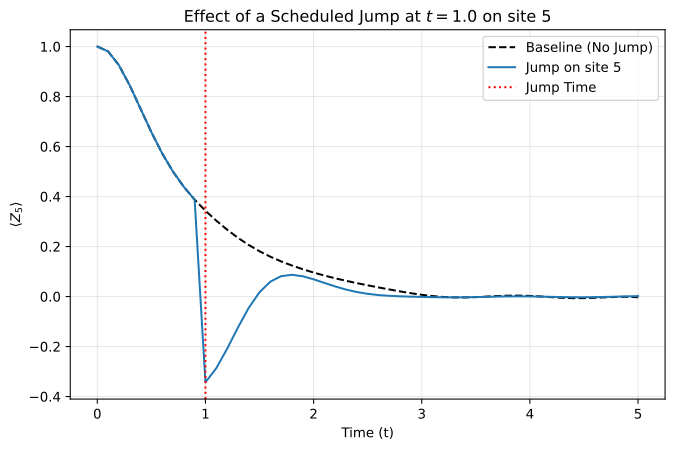
In this example, we simulate a 10-site Ising chain and apply a scheduled Pauli-X flip to a specific site at \(t=1.0\).
Important
Scheduled jump times must lie on the simulation time grid: choose time as a multiple of dt (for example dt=0.1 → 0.0, 0.1, 0.2, …).
1. Setup¶
First, we define the Hamiltonian and the initial state. We’ll use a standard transverse-field Ising model.
 1from mqt.yaqs import Hamiltonian, State
 2
 3L = 10
 4J = 1.0
 5g = 1.0
 6
 7# Hamiltonian: H = -J Σ Z_i Z_{i+1} - g Σ X_i
 8hamiltonian = Hamiltonian.ising(length=L, J=J, g=g)
 9
10# Initial state: all zeros |00...0>
11state = State(L, initial="zeros")
2. Define the Scheduled Jump¶
We define a scheduled jump using a list of dictionaries in the NoiseModel. Each dictionary must specify:
time: The time at which to apply the jump.sites: A list of site indices the jump acts on.name: The name of the jump operator (e.g.,"x","y","z","crosstalk_xx"), or any label when you pass a custommatrix(see below).
If matrix is omitted, name is resolved from NoiseLibrary. To apply a custom operator, add a matrix key with a local d×d NumPy array (d=2 for qubits); name is then only an identifier. See Realistic Noise Models § 6 for the full process-dict schema.
1from mqt.yaqs import NoiseModel
2
3jump_time = 1.0
4jump_site = 5 # Apply jump to the middle site
5
6# Schedule a Pauli-X flip on site 5 at t=1.0
7scheduled_jumps = [{"time": jump_time, "sites": [jump_site], "name": "x"}]
8noise_model = NoiseModel(scheduled_jumps=scheduled_jumps)
Custom operator example¶
A \(\pi/2 rotation about \)Y$ can be scheduled explicitly instead of using a library name:
1import numpy as np
2
3ry_pi2 = np.array([[1, -1], [1, 1]], dtype=complex) / np.sqrt(2)
4
5custom_jump = [{"time": jump_time, "sites": [jump_site], "name": "ry_pi2", "matrix": ry_pi2}]
6custom_noise_model = NoiseModel(scheduled_jumps=custom_jump)
3. Simulation Parameters¶
We measure the \(Z\) expectation value on the jumped site (\(\langle Z_5 \rangle\)). A Pauli-X jump flips that site’s magnetization; measuring a distant site would show only a weak entanglement signal and can look like no jump occurred.
 1from mqt.yaqs import AnalogSimParams, Observable
 2
 3z_obs = Observable("z", sites=jump_site)
 4
 5sim_params = AnalogSimParams(
 6    elapsed_time=5.0,
 7    dt=0.1,
 8    num_traj=1, # Jumps are deterministic, so 1 trajectory is sufficient
 9    observables=[z_obs],
10)
4. Run Simulation¶
We run two simulations: one with the jump and a baseline without it.
 1from mqt.yaqs import Simulator
 2import copy
 3
 4sim = Simulator(show_progress=False)
 5
 6# Baseline
 7state_baseline = copy.deepcopy(state)
 8sim_params_baseline = copy.deepcopy(sim_params)
 9result_baseline = sim.run(state_baseline, hamiltonian, sim_params_baseline)
10
11# With Jump
12state_jump = copy.deepcopy(state)
13sim_params_jump = copy.deepcopy(sim_params)
14result_jump = sim.run(state_jump, hamiltonian, sim_params_jump, noise_model=noise_model)
5. Visualize Results¶
We plot the expectation value \(\langle Z_{\text{jump site}} \rangle\) over time.
 1import matplotlib.pyplot as plt
 2
 3times = sim_params_jump.times
 4res_baseline = result_baseline.expectation_values[0]
 5res_jump = result_jump.expectation_values[0]
 6
 7plt.figure(figsize=(8, 5))
 8plt.plot(times, res_baseline, label="Baseline (No Jump)", color="black", linestyle="--")
 9plt.plot(times, res_jump, label=f"Jump on site {jump_site}", color="tab:blue")
10plt.axvline(x=jump_time, color='red', linestyle=':', label="Jump Time")
11
12plt.xlabel("Time (t)")
13plt.ylabel(f"$\\langle Z_{{{jump_site}}} \\rangle$")
14plt.title(f"Effect of a Scheduled Jump at $t={jump_time}$ on site {jump_site}")
15plt.legend()
16plt.grid(True, alpha=0.3)
17plt.show()